Troubleshooting Guide
Use this section for self-diagnosis steps before escalating to support.
Many common issues can be resolved without needing direct contact.
Typical troubleshooting categories:
If a problem persists after reviewing the above, escalate through the Customer Support or Ticket channels with all diagnostics collected.
Telegram Issues
The most common reason the integration is not working is because the bot has not been added as an admin and/or the admin permission are restricted. To resolve this issue follow the steps below.
1. Confirm the Bot Has Admin Privileges
Verify that the bot has been promoted to an administrator within the group. Simply adding the bot as a member is insufficient; it must be explicitly assigned admin status and granted the required permissions for its functions to operate correctly.
iPhone — Make a Group Member an Admin
- Open Telegram.
- Open the target group.
- Tap the group name at the top.
- Tap Edit (top right).
- Tap Administrators.
- Tap Add Admin.
- Select the Integration.
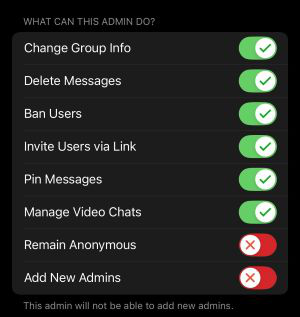
- Configure admin permissions.
- Tap Done to confirm.
Android — Make a Group Member an Admin
- Open Telegram.
- Open the target group.
- Tap the group name at the top.
- Tap the pencil/edit icon.
- Tap Administrators.
- Tap Add Admin.
- Select the member.
- Set admin permissions as required.
- Tap the checkmark to confirm.
2. Confirm Bot permissions
Verify that the bot has been granted the required permissions for its intended operations. Review the bot’s administrator permission settings and ensure they align exactly with the specified configuration shown in the reference image. Missing or restricted permissions may prevent the bot from functioning as expected.