Contact > Customer Support
Customer Support resolves operational issues affecting accounts, transactions, payouts, and platform functionality.
Use this section when encountering:
- Account access problems
- Transaction delays or discrepancies
- Payout or withdrawal issues
- Dashboard errors or configuration problems
- General service-related concerns
Provide Support Id's, transaction IDs (TXID's), to enable faster investigation.
Create a Ticket
When an issue requires direct assistance, submit a support ticket to ensure proper tracking and escalation.
Recommended ticket preparation:
- Describe the issue concisely
- Support ID's and/or Transaction ID's (TXID's)
- Include affected account
- Add environment or browser details
- Attach logs or screenshots if relevant
- Clarify urgency and operational impact
Well-formed tickets lead to faster resolution and accurate routing to the correct team.
Contact SupportWhatsApp Support
Connect directly with the Customer Support team through our WhatsApp integration. This channel allows immediate conversation with full message context. You can also scan the QR code displayed on this page to connect instantly.
WhatsApp Integration:
Telegram
Add the Telegram integration to your Telegram group to connect directly with our Support team. This links your internal team in a single thread, enabling shared context, faster issue resolution, and real-time coordination with a support representative.
1. Create a new Telegram group and name it after your business.
Example"Company x Coinpayments - Support"
2. Add the Integrations bot as a member of the group:
or
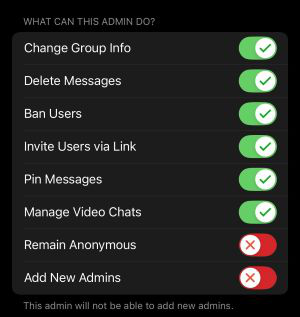
3. Now make the bot an admin of the group with the permission below:
Note:
If the permissions do not match the integration will not work.
4. Send a message to the bot that includes
- Brand name of your company
- legal entity if different
- First Name
- Last name
- Email address associated with your account
- What you need help with (if required)
Once completed, you will be connected with a member of our Support team who can assist you with transaction status inquiries and FAQ's
Note:
Although we refer to this as a “bot,” all replies you receive are from live agents.
Slack
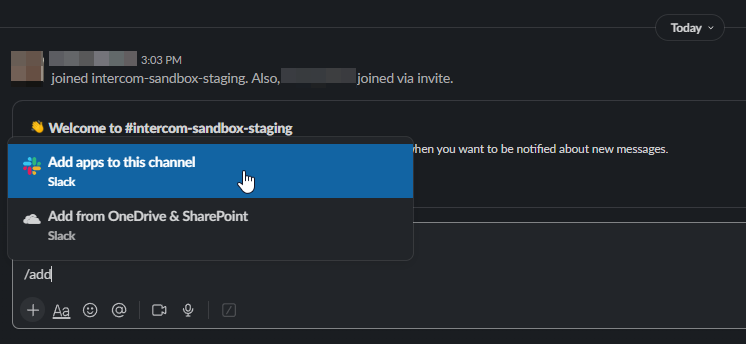
Execute the /add Command
This will prompt you to install an application to the current channel.
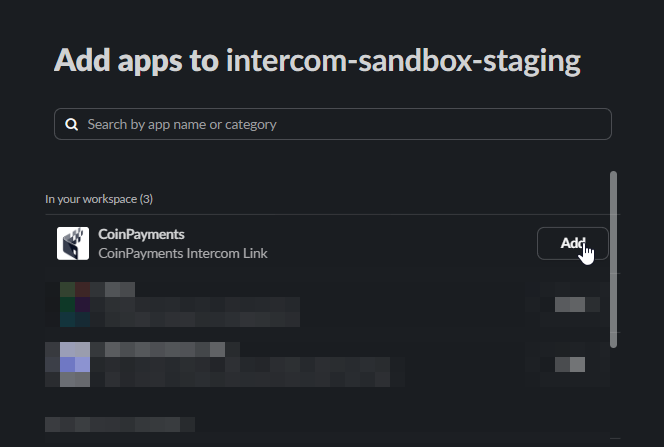
Add the "CoinPayments" App
Locate the "CoinPayments" Support app within Slack.
Select Inbox Type
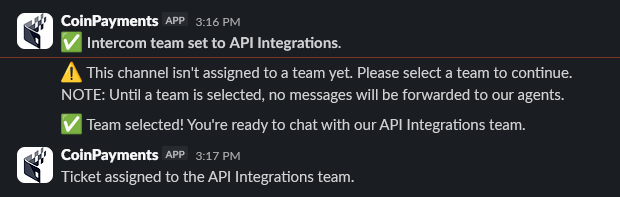
Select the department you would like this conversation to be opened with.

Optional: Remove Slack Connection
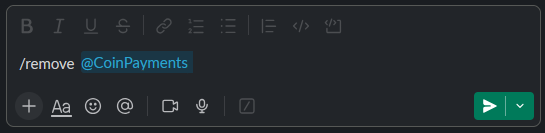
Execute the /remove @CoinPayments command to remove the integration.